Paracosm Studio Worldbuilding software

Give your setting a home

Worldbuilding software for the connections between your ideas.

Paracosm Studio brings generated worlds, editable maps, civilisations, a Wiki and writing projects into one browser-based workspace. Use the geography to ask better questions, record the answers as canon, and put them to work in a story or campaign.

Alpha v1.0 · Create and edit on desktop · View saved work on mobile

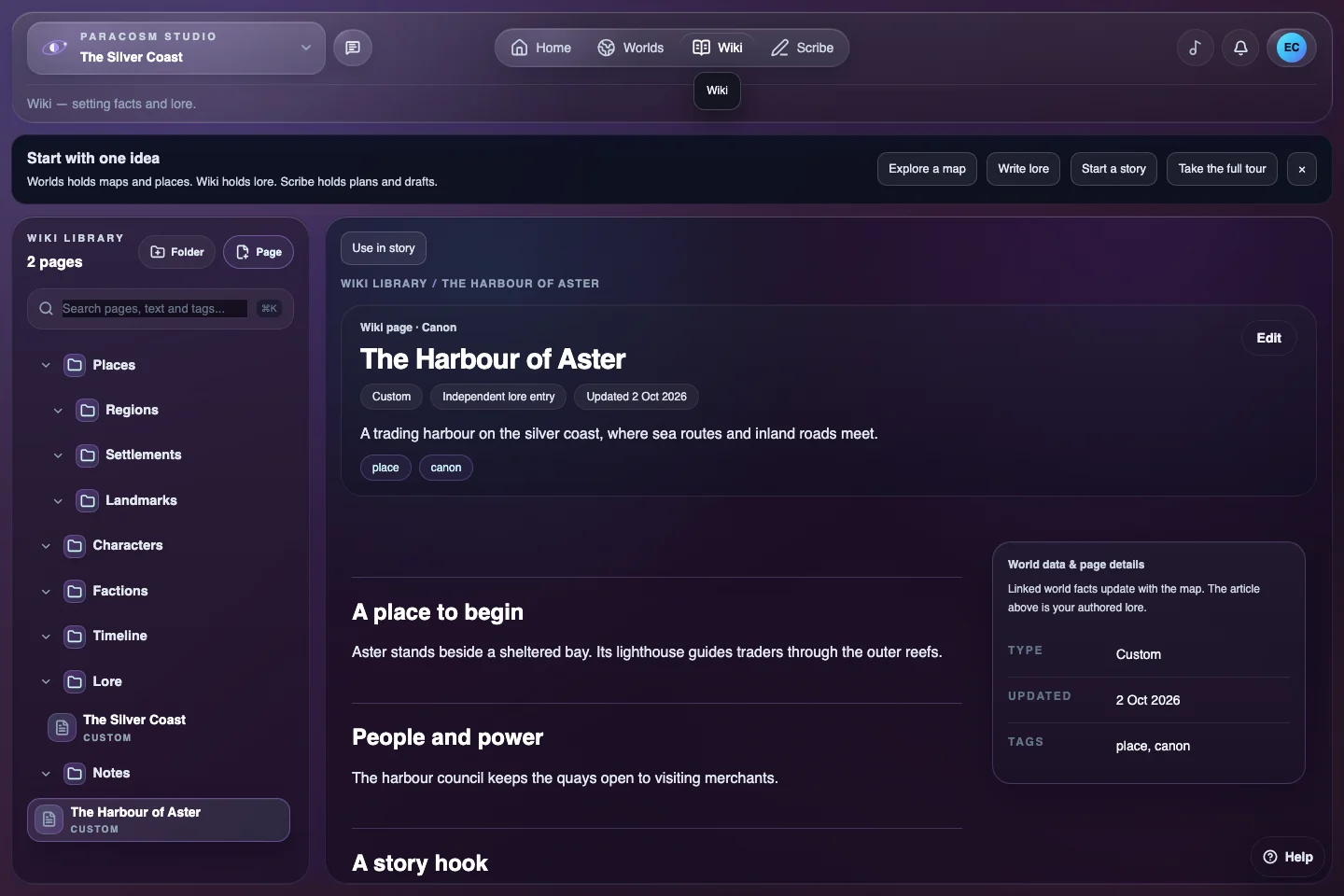
The Paracosm Studio Wiki with setting folders, a selected lore page and its writing workspace.
Use the Wiki for established lore and link it to the places and people it describes.

Understand the three parts of a setting

A Paracosm is the workspace for your setting. Worlds holds its physical structure: systems, stars, planets, moons, maps and the places within them. You can begin with a single generated world or an empty setting and add detail as you need it.

The Wiki holds written canon, while Scribe contains stories, campaigns, documents and planning boards. Keeping these roles clear helps you decide where a new idea belongs without creating several competing copies.

Build depth where it serves the setting

Start with a broad landscape and a few places that matter. Develop a settlement, state or culture alongside the geography it occupies. Then write the explanations that structured map data cannot provide: what the people believe, what they need and what they disagree about.

A practical loop is to shape a place, name it, explain its importance, introduce a pressure and test it in writing. Return to the map or canon when the scene reveals a better answer. There is no need to fill every field before the world is useful.

Keep established facts separate from possibilities

Use the Wiki for decisions you have made about the setting. Keep rough thoughts in asset notes and narrative alternatives in Scribe. Tags and page organisation can help you distinguish a firm fact from a question you are still exploring.

References connect work across these areas, but ordinary prose still needs editorial review. Renaming a settlement on the map does not automatically rewrite every mention in your story. Review linked lore and typed names when an important fact changes.

Choose the current toolkit with clear expectations

Paracosm Studio is Alpha v1.0. Worlds, Wiki and Scribe are available, but features marked Coming soon are not part of the current release. In particular, do not plan around the dedicated Life, Resources or History tools being complete.

The Free plan supports a small setting and includes basic map views such as Clean Map and Natural Atlas. Paid plans offer more capacity and premium customisation. Use a desktop or laptop to edit; mobile provides viewing of saved content. Read the current plans and device requirements before committing a large project.

Put it into practice

A connected worldbuilding loop

  1. Shape the physical setting

    Generate a world or begin with a blank Paracosm. Choose one place to develop first.

  2. Record the useful facts

    Create a linked Wiki page with a summary, a concrete detail and an unanswered question.

  3. Test it through a story

    Open Scribe, write a scene or campaign note and revise the setting when the narrative needs it.

Before you begin

Common questions

More detail in the Help Centre and device requirements.

What is a Paracosm?

A Paracosm is your top-level setting workspace. It keeps its worlds, connected lore and writing together. A planet is one body inside that setting, rather than a separate copy of the whole project.

Can I start with lore instead of a generated planet?

Yes. The first creation screen offers a blank Paracosm as well as a guided generated world. Start with lore or writing, then add the physical setting when you need it.

Does local world generation mean the studio works completely offline?

No. Terrain generation runs in your browser, but sign-in, cloud saving, synchronisation and sharing need an internet connection. Check cloud save status and keep independent exports for important work.

Can I use it for a tabletop campaign?

Scribe has Campaign projects as well as Story projects. Both support writing documents and planning boards, with references to Wiki content. This supports setting and session preparation; it should not be assumed to provide a complete virtual tabletop or live multiplayer play.

Start with one idea.

Create your account, then build your first setting on desktop.

Create your Paracosm